Docs › Modules › Sales › Operating activity Sales › Sales › File on Sale
Connecting the financial row in SO
Interface for financial allocation of a line in a SO. It consists of Direct link (1), Indirect link (2), Information (3) and Buttons (4):
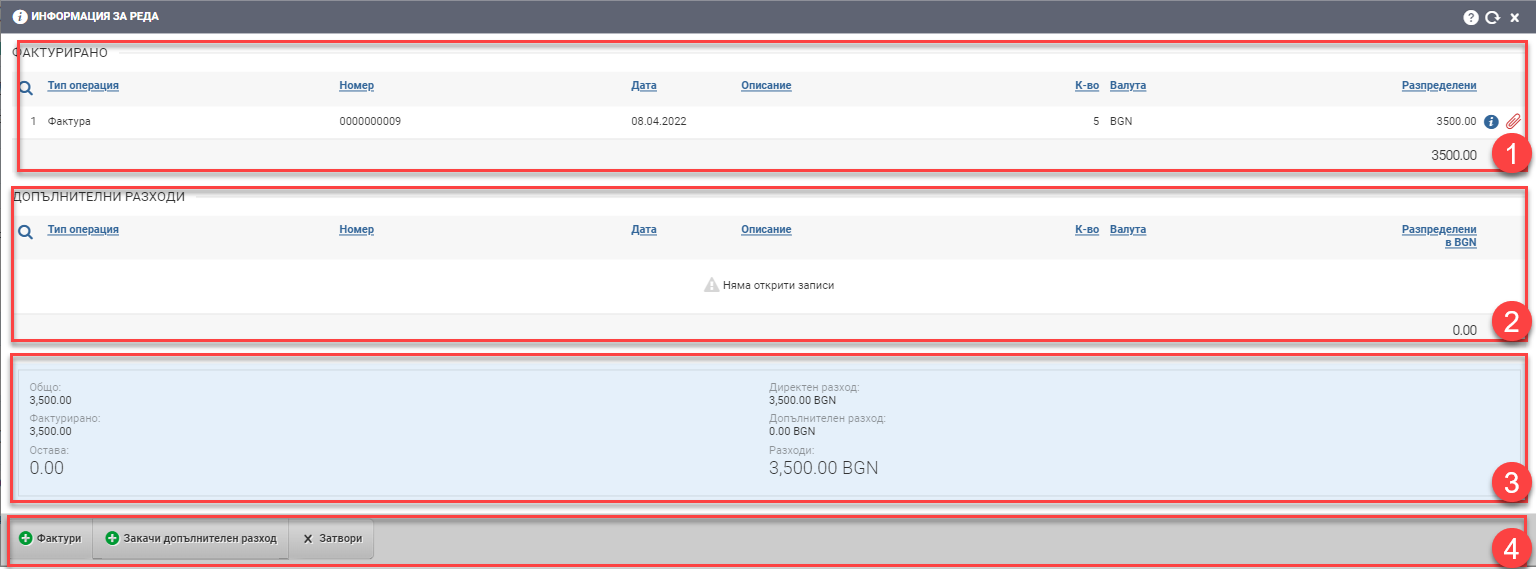
Direct connection (1)
The field displays the financial document pinned directly to the sale/order line. This is, for example, the invoice you use to invoice the customer for the sale. The field shows you information about the document such as:
- Transaction type – Invoice/Receipt/Proforma
- Financial document number
- Date of the financial document
- Description
- Quantity
- Currency
- Value of distribution
- opening the file of the financial document
- Button to unhitch/hook the financial link
Indirect connection (2)
The field displays the financial documents attached indirectly to the line. They accumulate additional costs. The field shows you information about the document such as:
- Transaction type – Invoice/Receipt/Proforma
- Financial document number
- Date of the financial document
- Description
- Quantity
- Currency
- Value of distribution
- opening the file of the financial document
- Button to unhitch/hook the financial link
Information (3)
The field displays detailed information about the allocations to the row.
Buttons (4)
With the first button you can attach a financial document directly to the row.
With the second button Attach additional expense you can indirectly attach a financial document to the row.
Click Close to exit the interface.