Docs › Modules › Sales › Operating activity Sales › Sales
Separation of Sale
Sales split interface. It consists of Lines (1):
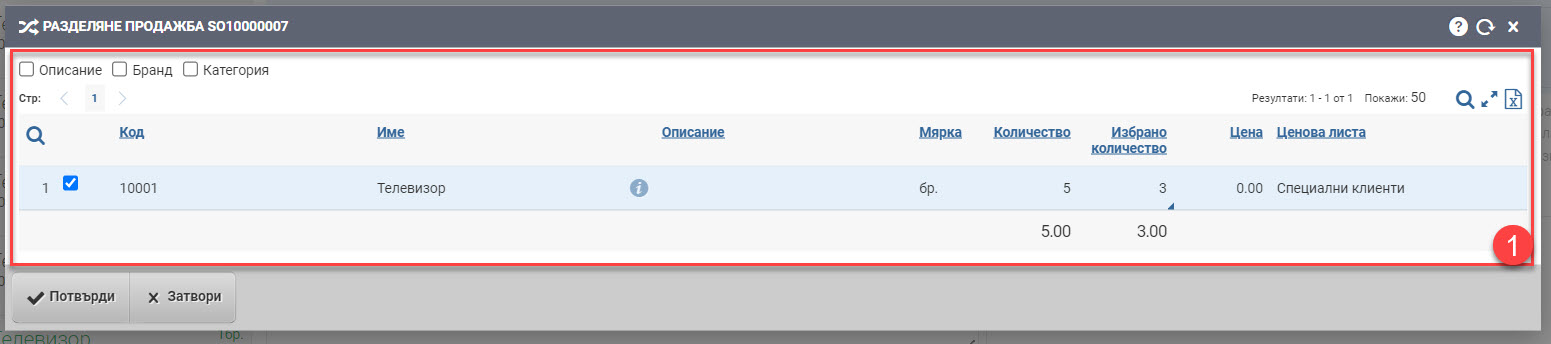
The rows show you the items that are entered in the sale in a table with the following information:
| Column | Description |
| Code | Item code. |
| Name | Item Name. |
| Opens an item file. | |
| Description | Item description. |
| Measure | Measure of the item in the sale. |
| Quantity | Quantity of the item on sale. |
| Selected quantity | You specify a quantity for the new sale. |
| Price | Price of the item in the sale. |
| Price list | Price list used in the sale of the item. |
Splitting the sale occurs by entering a new item value in the Selected Quantity field. You select which order you want to move to New Sale, enter what quantity you want to move and confirm. This will generate a new sales document with the same Customer, POS etc details as the old sale you are splitting. In the old sale will remain the remainder of the quantity of the selected order.
The split sale is finalized by clicking the Confirm button. If you want to exit without making any changes, click Close.