Own events
The CRM interface > Tasks > Own Events displays a list of events created by the user logged into the system, as well as all of their customers’ events. The interface consists of Header (1), Filter (2) and List (3):
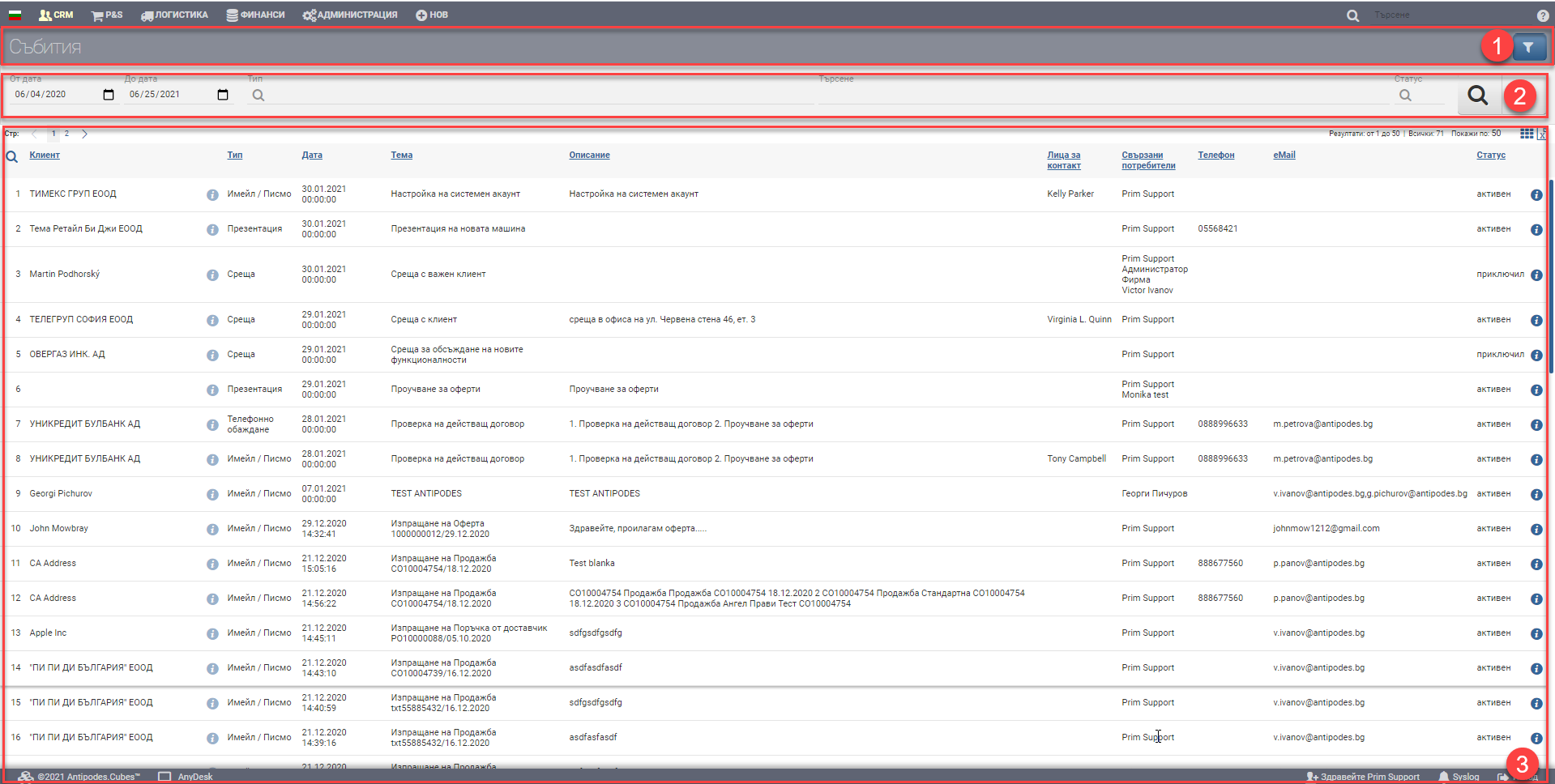
In the Header (1) is the name of the report and the button to hide/show the filter.
Filter (2) controls the Results (3) and can filter in the following ways:
| Option | Description |
| From date – to date | Filter based on when the event took place/will take place |
| Type | Select from the drop-down menu which event type(s) you want to display in the result |
| Search | Free text search field |
| Status | Filter by event status- active/completed |
The result (3) is a list of events based on the criteria you specified, with the following columns:
| Column | Description |
| Client | Event Contractor |
| Opens a counterparty file | |
| Type | Event type |
| Date | Date of the event |
| Topic | Theme of the event |
| Description | Event description |
| Contact persons | Contact person of the counterparty to which the event is associated |
| Related users | Related users in the event |
| Phone | Phone |
| Status | Event status – active/completed |
| Opens the event file |