Docs › Modules › Sales › Operating activity Sales › Sales
Blocking / Unblocking by Sale
Interface for blocking/unblocking quantities by sales. It consists of Stock (1), Warehouse (2) and Blocking Stock (3):
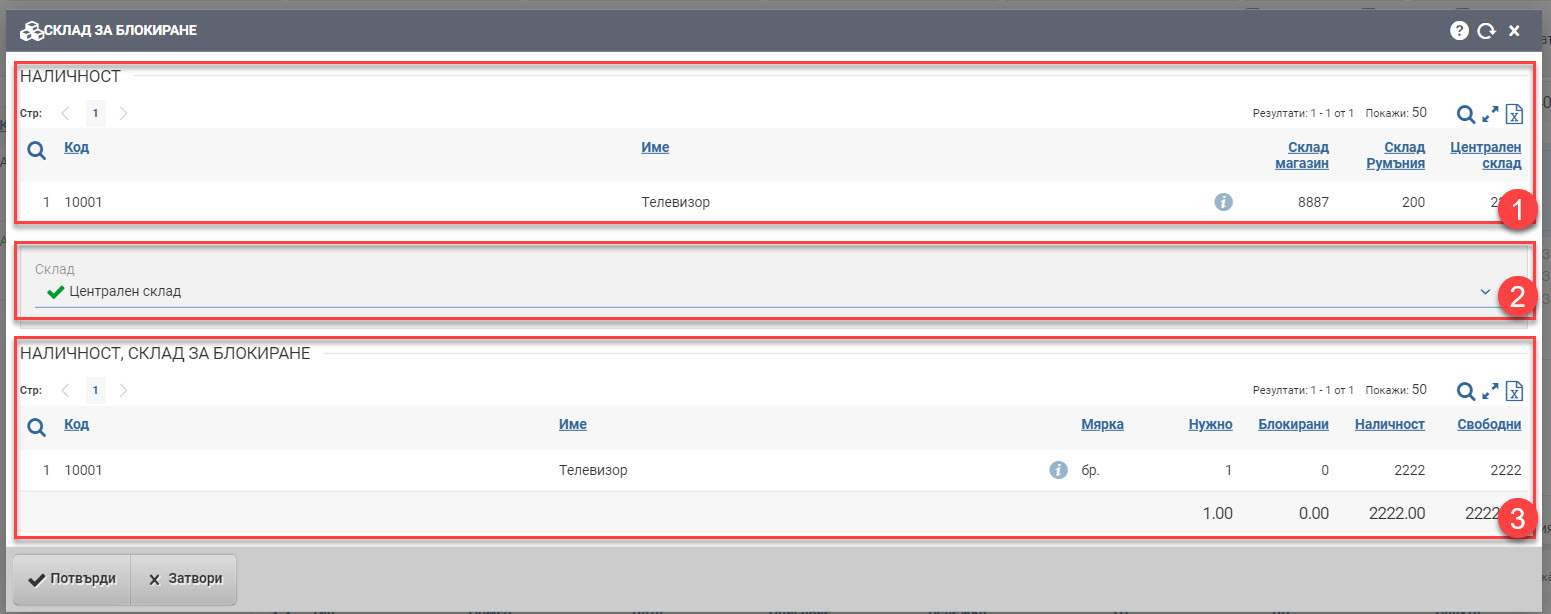
Availability (1)
The first field shows the stock of the items you want to block in the warehouses you have rights to. The list contains the following columns of information:
| Column | Description |
| Code | Item code. |
| Name | Item Name. |
| Opens an item file. | |
| Warehouses | The amount of columns and varies according to your permissions. The columns show warehouses and their availability of the specific item. |
Interlock Warehouse (2)
Select which warehouse you want to block the quantities from the drop-down menu.
Blocking stock (3)
Once you have selected a warehouse to block, the system shows you additional information about the status of the quantities in it in the following columns:
| Column | Description |
| Code | Item code. |
| Name | Item Name. |
| Opens an item file. | |
| Measure | Measure of the blocking item. |
| Need | Quantity you will request to block. |
| Blocked | The quantity of items already blocked in the warehouse. |
| Availability | Item availability in the warehouse. |
| Free | How many items are left available for sale. Calculated as the difference between Available and Blocked. |
Blocking is confirmed with the Confirm button, and Close returns you to the front interface without making any changes.
Unblocking quantities by sales only requires confirmation.