Docs › Modules › Orders › Operational activity Orders › Orders
Export of orders
The interface for exporting order lines. It consists of Fields (1) and Buttons (2).
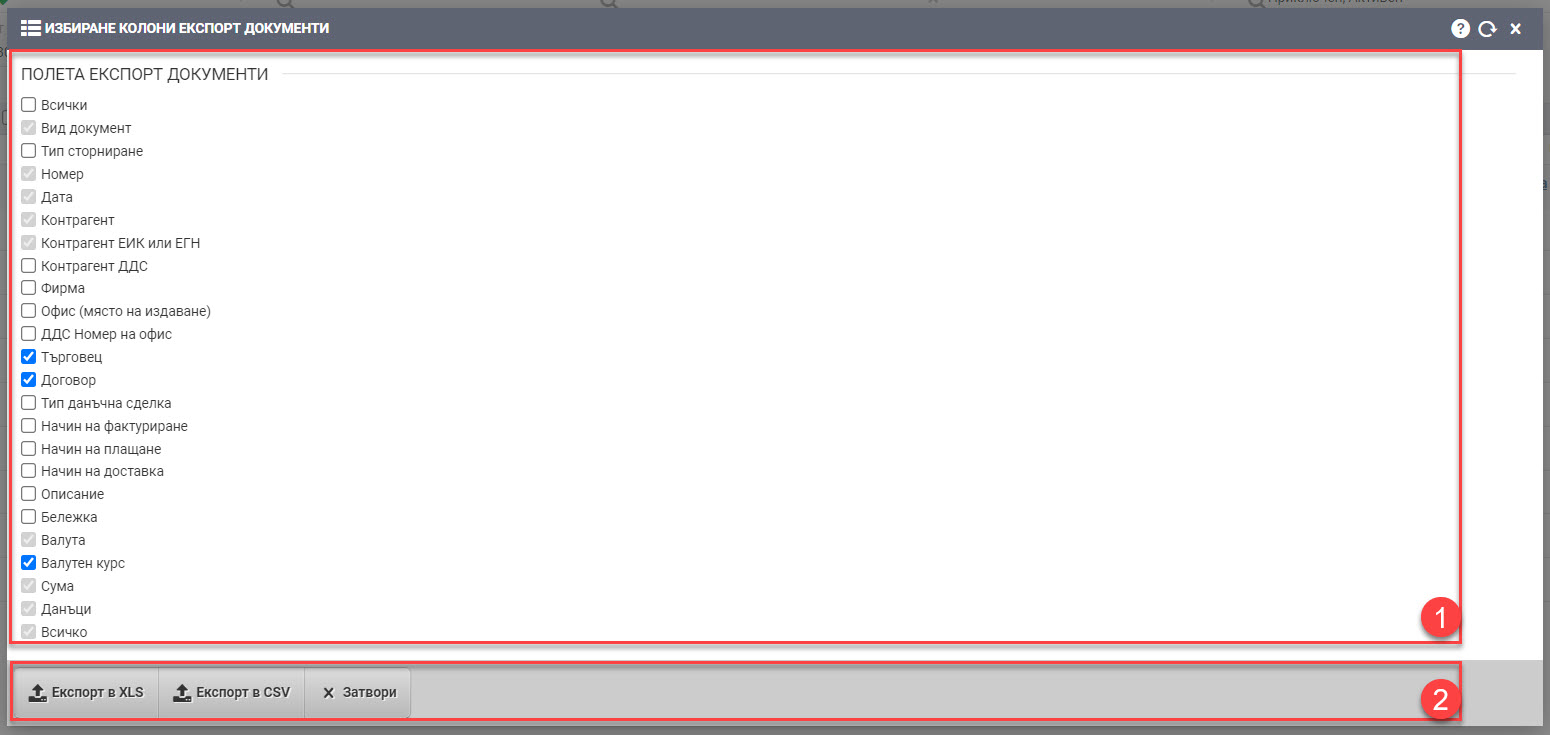
Fields (1)
In Fields (1), you control what information you want your export file to contain. The fields are columns in an XLS file type or an element in a CSV file type. They are of two types:
1. Columns that must be present in the export:
- Document type
- Number
- Date
- Contractor
- Contractor UIC or PIN
- Contractor VAT
- Item name
- Description, order of document
- Currency
- Exchange rate
- Sum
- Taxes
- All
2.Columns you can include in the export if needed:
- All (will mark absolutely all fields and download them to the file)
- Type of reversal
- Office, place of issue
- VAT office number
- Merchant
- Contract
- Type of tax transaction
- Percentage tax
- Method of invoicing
- Payment method
- Method of delivery
- Item code
- Brand
- Category
- Quantity
- Price before discount, single
- Discount, single, amount
- Price, single
- Amount before discount
- Discount, amount
Buttons (2)
Once you have selected which fields you need in the export, you can start it with one of the two buttons- Export to XLS or Export to CSV.
The Close button closes you from the interface after you have downloaded the files or if you are not going to take any action.