

Turn AI from a chat window into real work
Prim.io MCP lets Claude, ChatGPT, Cursor work with the stock, orders, customers and finances that run your business - with secure sign-in and permissions you control.



 MCP
MCP
Ready to make some magic?
Put your ERP data and AI together, and you’ll find answers you didn’t know to look for.
Get answers in seconds. Automate repetitive work.
Connect Prim MCP once, approve the tools it can use, and ask your AI about stock, orders, customers and cash in plain language. There’s no report to build first.
And it’s not read-only, so you can automate work too. Whether you use it directly or build it into external workflows, many operations can run automatically. Work that used to take hours now takes seconds.
Like every user in Prim, every AI agent has its own permissions.
Decide which tools each connection can use and which actions need approval, whether your team works in Claude, ChatGPT or Cursor.
- OAuth 2.0 sign-in to your own Prim instance
- Tool-level approval in every supported client
- Access bound to the authorised Prim user
- Changes reviewed before they run
What will you build with Prim MCP?
“Which bestsellers will run out this week across our stores? Suggest transfers before we reorder.”
“List yesterday’s web orders that haven’t shipped yet and draft a short update for each customer.”
“Summarise this month’s income and expense allocations by cost centre and flag anything unusual.”
“Find customers with incomplete delivery addresses and prepare the corrections for my approval.”
Example prompts. Available tools depend on your Prim instance and the permissions of the connected user.
AI that works with you
Let AI find the right tool
Your AI reads the Prim tool catalog and picks the lookup or action that fits the question. Nothing to preload or configure per task.
Ask in plain language
Ask about stock, orders, customers and finances the way you’d ask a colleague. The answer comes from Prim, not from guesswork.
Use the AI tool you prefer
Claude, ChatGPT or Cursor. Switch clients without rebuilding the connection; the tools and data stay in Prim.
Stay in control
Choose which tools each client can use, require approval for changes, and remove access at any time.
Keep credentials safe
Sign-in runs through OAuth 2.0 against your own Prim instance. Your password is never passed to the model.
Go further with the API
When a workflow outgrows chat, developers can build on the same data with the Prim HTTP API.
More than a chat about your documentation.
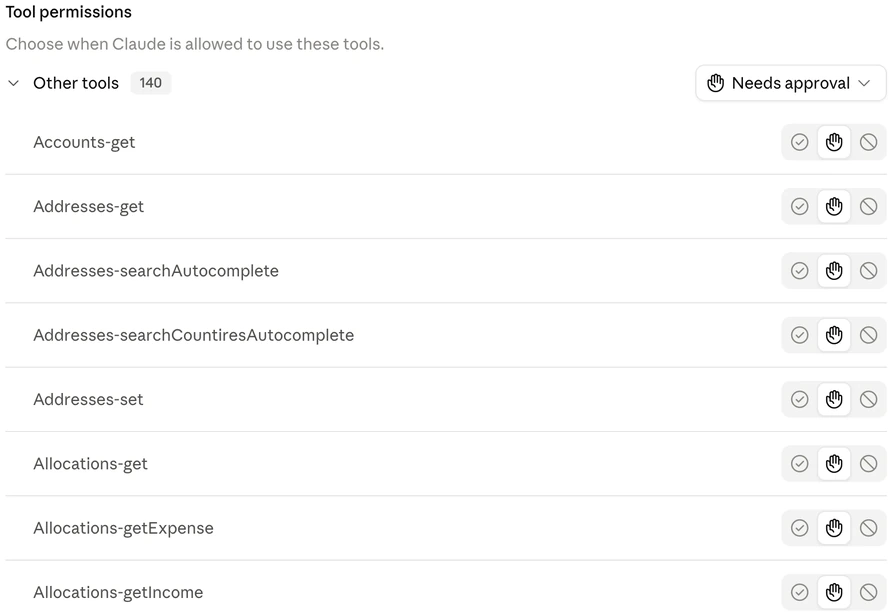
The connected server exposes operational tools. These examples come from the Prim catalog displayed by Claude—not from a hypothetical integration.
The client lets you review its available tools before using them.
Use Prim MCP in Claude, ChatGPT or Cursor.
Prim connects to Claude, ChatGPT and Cursor as a remote MCP server. Start with your administrator's approved endpoint and access.
Using another client? Ask us to confirm its connection and authentication support.
Get your instance details
Ask your Prim administrator or our team for your MCP URL and the appropriate access. Do not use another company's endpoint or share its credentials.
Add the connection
In Claude: open Settings → Connectors and add a custom connector with the supplied URL. Follow the authorisation flow for your instance.
In ChatGPT: turn on Developer mode under Settings → Security and login, then open Plugins, select + and add the same URL. Workspace policy can restrict developer mode.
In Cursor: add the same URL as a custom server from the Customize page or in mcp.json. Cursor opens the sign-in flow for your instance.
Review the tools
Open the connector's tool-permissions list. Check which tools you intend to use. Start with a narrow task and keep Needs approval in Claude, keep action confirmations on in ChatGPT, and leave tool approval on in Cursor, for tools you want to review.
Check a small result first
Use a test record approved by your administrator. Compare the answer with Prim before expanding the workflow or allowing changes.
Inspect the contract.
Don't guess the parameters.
MCP clients discover tools and their input schemas from the server. Use the schema from the active connection rather than assuming the HTTP API and MCP accept identical requests.
Standard MCP discovery request
{
  "jsonrpc": "2.0",
  "id": 1,
  "method": "tools/list",
  "params": {}
}
Protocol example after connection and authentication—not a recorded Prim response or a complete standalone setup command. Follow any pagination cursor to obtain the full catalog.
Read the MCP tools specification ↗The HTTP API is a separate reference.
Prim also publishes a business API with method-level documentation. It is useful for understanding the underlying operations, but its catalog is not a guarantee of MCP coverage.
- Stock availability API
Availabilities.get - Sales orders API
So.get · So.set - Full HTTP API reference Methods, parameters and examples
Questions before you connect.
Is Prim MCP read-only?
The observed catalog includes both retrieval names and Addresses-set, a write-oriented tool. Do not treat the whole connection as read-only. Confirm the available tools and server permissions, and block or require approval for actions you do not want the client to perform freely.
Does it work with every AI application?
No blanket compatibility claim is made. Prim is set up for Claude, ChatGPT and Cursor. Other clients need to support the server's transport and authentication flow; ask us to validate your intended setup.
Are the examples on this page live business results?
No. The listed tool names were observed in a connected client. The JSON is a standard protocol example. No customer records or successful business-operation results are presented as proof.
How do we confirm availability and access?
Contact the Prim team with your instance, intended AI client and the workflow you want to support. We'll confirm setup and availability before you build around it.
Start with a workflow your team knows.
Tell us which information you need and what, if anything, AI should be allowed to change.
Talk to us about MCPClaude is a trademark of Anthropic. ChatGPT and OpenAI are trademarks of OpenAI. Cursor is a trademark of Anysphere. The marks identify the connected clients; no partnership or endorsement is implied.